fdnr-vst3
FND Reverb

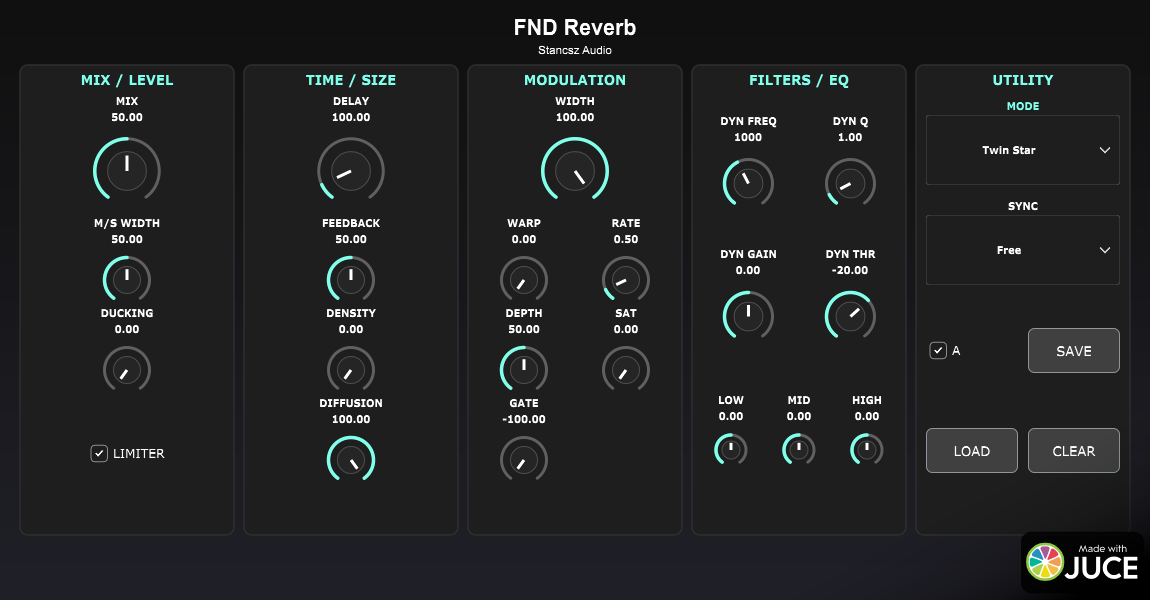

FND Reverb is an open-source, modular reverb engine by Stancsz Audio offering high-fidelity algorithms inspired by classic space reverberators. It features deep modulation, multiple reverb modes, and VST3 compatibility.
Features
- 21 Unique Reverb Modes: Ranging from fast echoes to massive lush spaces and looping delays.
- Modular DSP Chain:
- Pre-Delay: Up to 2000ms with modulation.
- Warp: Controls the modulation feedback and character.
- Reverb Core: Feedback Delay Network (FDN) based reverb with feedback and density controls.
- EQ: Integrated 3-Band and Dynamic EQ with Low/High cut filters.
- Dynamics: Built-in Ducking and Gating for cleaner mixes.
- Deep Modulation: Adjustable Rate and Depth for chorus-like textures or pitch-shifting tails.
- Workflow: Resizable UI, A/B switching, and JSON preset management.
- Custom UI: Modern dark theme with cyan accents, inspired by classic hardware.
Controls
- MIX: Controls the balance between the dry and wet signal.
- DELAY: Sets the pre-delay time (0-1000ms).
- FEEDBACK: Controls the decay time of the reverb tail.
- WIDTH: Adjusts the stereo width of the output.
- WARP: Adds modulation feedback and coloration.
- DENSITY: Controls the density/diffusion of the reverb reflections.
- MOD RATE: Sets the speed of the modulation LFO.
- MOD DEPTH: Sets the intensity of the modulation.
- EQ HIGH/LOW: Cuts high or low frequencies from the reverb tail.
Algorithms (Modes)
- Twin Star: Fast attack, shorter decay, high echo density.
- Sea Serpent: Fast-ish attack, shorter decay, varying density.
- Horse Man: Medium attack, longer decay, medium-high density.
- Archer: Slow attack, longer decay, high density.
- Void Maker: Medium attack, very long decay, massive spaces.
- Galaxy Spiral: Slowest attack, very long decay, very high density.
- Harp String, Goat Horn, Nebula Cloud, Triangle: Various combinations of attack, decay, and echo patterns.
- Cloud Major/Minor: Strange repeating patterns with low density.
- Queen Chair/Hunter Belt: Low initial density building to massive reverbs.
- Water Bearer/Two Fish: EchoVerb algorithms with audible delays morphing into reverb.
- Scorpion Tail, Balance Scale, Lion Heart, Maiden, Seven Sisters: Complex feedback and filtering networks.
Installation
For Users
Download the latest Release for your operating system (Windows or Mac) from the Releases page, or use the download badge above which links to the current Windows release.
- Unzip the downloaded
.zipfile (e.g.,FDNR_VST3_Windows.zip). - VST3 Plugin:
- Find the
FDNR.vst3file (or folder). - Copy it to your system’s VST3 directory:
- Windows:
C:\Program Files\Common Files\VST3\ - Mac:
/Library/Audio/Plug-Ins/VST3/
- Windows:
- Find the
- Standalone Application (Optional):
- Find the
FDNRexecutable (or app bundle). - You can run this directly or copy it to your Applications folder.
- Find the
If the plugin doesn’t appear in your host
- Confirm the
.vst3file is in a folder the DAW scans. - Rescan or restart the host application.
- Check file permissions (macOS) and architecture (x64 vs arm64) compatibility.
- See
release/for prebuilt zips.
For Developers
See the Build Instructions below.
Build Instructions
Prerequisites
- CMake (3.15 or higher)
- C++ Compiler with C++17 support (MSVC, Clang, GCC)
Building
macOS
cmake -B build -S . -DCMAKE_BUILD_TYPE=Release
cmake --build build --config Release
Windows
cmake -B build -S .
cmake --build build --config Release
The compiled VST3 plugin will be located in:
build/FDNR_artefacts/Release/VST3/(Windows)- Or
build/FDNR_artefacts/VST3/(depending on CMake generator)
The Standalone application will be in:
build/FDNR_artefacts/Release/Standalone/- Or
build/FDNR_artefacts/Standalone/
Project Structure
- Source/: Contains the C++ source code.
PluginProcessor.cpp/h: Handles audio processing and state management.PluginEditor.cpp/h: Handles the GUI implementation.ReverbProcessor.cpp/h: Encapsulates the core DSP logic.
- release/: Contains the zipped release artifacts (for example:
FDNR_VST3_Windows.zip). - docs/screenshot.png: UI screenshot used in documentation.
Contributing
- Fork, make changes, and open a PR.
- When changing UI assets, update the plugin screenshot (see
AGENTS.mdrules in the repo root).
License
This project is open-source. JUCE is used under the GPLv3/Commercial license.
Credits
This is an educational project exploring Feedback Delay Networks (FDN).